How to fix CORS error when using API Gateway with AWS Lambda

Note: If you’re wondering why you’re getting this email, you might’ve subscribed to my email list at cloudtechsimplified.com. I’m Mugilan Ragupathi and I’m an AWS Serverless Community Builder. I’ve moved all of my subscribers to Substack. Every Wednesday (Sydney, Australia Time), I would send an email with serverless tips or recipes.
CORS is one of the most common errors that a developer faces when building web applications, especially when you’re building SPAs (Single Page Applications).
What is CORS?
Let's say you have your API gateway at https://<random-id>.execute-api.us-east-1.amazonaws.com and your single-page application hosted in S3 backed by CloudFront at your domain www.your-domain.com
When you try to access the backend API through API Gateway from your react application, you may face Cross-Origin Resource Sharing(CORS) error.
CORS is a mechanism that allows a server to mention any origin(combination of domain, scheme, and port) that it wants to allow a browser to load the contents from it. I strongly recommend reading this article on CORS to understand it better.
CDK Application replicating CORS issue
Let's create a simple CDK application to replicate this issue.
In the below code snippet, we're creating a simple REST API with Lambda integration.
  const getMoviesFn = new NodejsFunction(this, "getMoviesFn", {
      entry: path.join(__dirname, "../lambdas", "get-movies.ts"),
      functionName: "getMoviesFn",
    });

    const api = new RestApi(this, "moviesApi", {
      restApiName: "movies-api",
    });

    const moviesIntegration = new LambdaIntegration(getMoviesFn);

    const moviesResource = api.root.addResource("movies");
    moviesResource.addMethod("GET", moviesIntegration);
When I try to call the API endpoint from react application using client-side javascript, I'm getting the below error
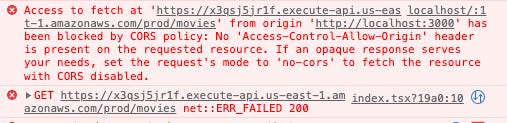
The above error is the CORS error. In plain English, the API endpoint doesn't allow requests from http://localhost:3000.
If you're using Lambda Proxy Integration, as we've used - you need to do the below things
Add default Cors Prelight Options to REST API
Return additional headers from the lambda function
Add Default CORS PreFlight Options to REST API:
You can add preflight options to REST API by adding property defaultCorsPreflightOptions - I've added 3 properties - allowOrigins , allowMethods and allowHeaders
const api = new RestApi(this, "moviesApi", {
      restApiName: "movies-api",
      defaultCorsPreflightOptions: {
        allowOrigins: ["http://localhost:3000"],
        allowMethods: ["OPTIONS", "GET", "POST", "PUT", "PATCH", "DELETE"],
        allowHeaders: Cors.DEFAULT_HEADERS,
      },
    });
In the above code snippet, I've added my localhost address to the list so that I can call API Gateway endpoints from my React application.
I've added a few methods to be allowed. You can configure it as per your needs. For example, you may want to allow read operations, and not create/update/delete operations from other domains - you can remove POST, PUT, PATCH, and DELETE from that list.
And finally, I allow the default headers.
Return additional header from lambda function
In the lambda function, you can add Access-Control-Allow-Origin a a header to be returned from the lambda function as shown in the code snippet below.
export const handler = async (event: any) => {
  const metaData = {
    headers: {
      "Access-Control-Allow-Origin": "http://localhost:3000",
    },
  };

  return {
    ...metaData,
    statusCode: 200,
    body: JSON.stringify(movies),
  };
};
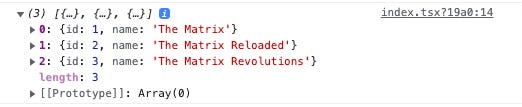
After deploying these changes, when I access the API endpoint from javascript in client side react application, I'm able to get the results as shown below
This article is originally published here.
If you’ve any queries, please reply to the email.